
How Rental Platform Listings Work for Captiva Families


A rental-platform listing is a structured digital property page that packages photos, pricing, availability, and trust signals into one place so you can evaluate and book a home with confidence. For families planning a luxury stay on Captiva Island, the single most important thing to check before anything else is whether the listing’s calendar, fee total, and cancellation terms are current and clearly stated.
Every listing you will encounter contains the same core elements:
Media: professional photos, optional 3D virtual tours, and floorplans
Pricing and fees: nightly or weekly rate, cleaning fee, taxes, and security deposit
Availability calendar: open dates, minimum stays, and blocked periods
Amenities and house rules: pool details, pet policy, check-in instructions
Host or manager contact: local phone, email, or direct-booking link
Trust signals: guest reviews, verified ID badge, booking protection
For Captiva luxury rentals specifically: confirm pool heating, beach access type, and the cancellation policy before you click Book.
Table of Contents
How does the rental listing process actually work for owners?
Checklist for families evaluating a luxury Captiva Island listing
What do platforms verify, and what should you confirm yourself?
How long does it take from listing creation to first booking?
How Captiva-Island.com listings work for families booking direct
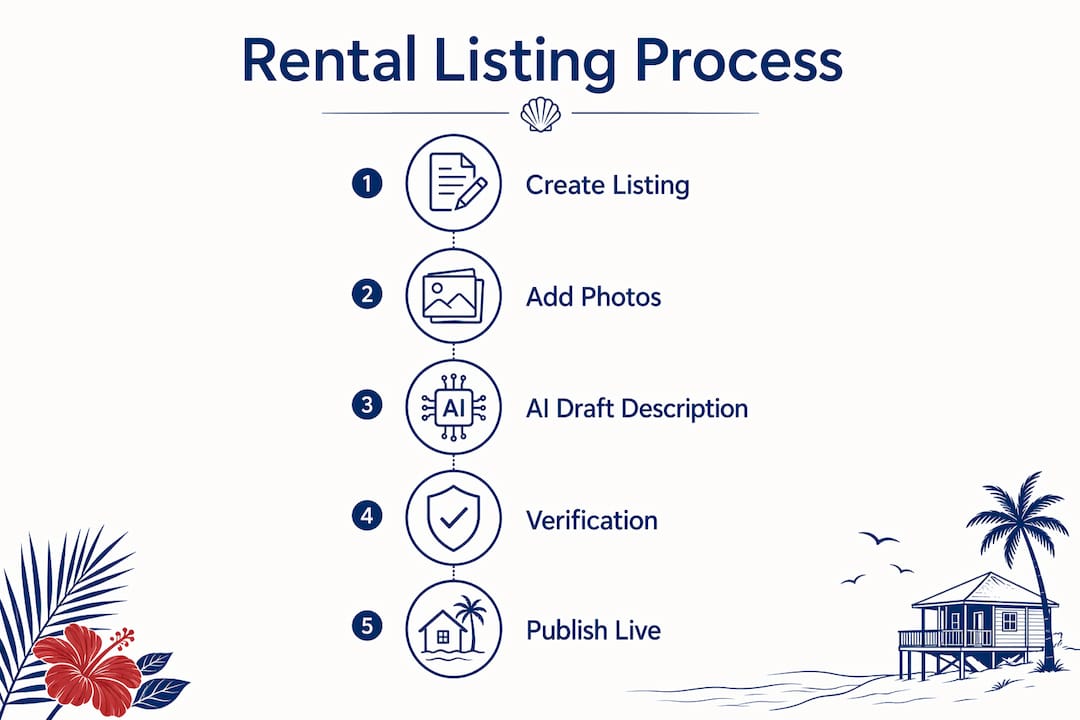
How does the rental listing process actually work for owners?
Creating a listing follows a predictable digital workflow, and understanding it helps you recognize why some listings feel polished while others feel incomplete.
Account setup and identity verification. The owner or property manager creates an account and completes phone verification. Most major platforms require this one-time step before any listing goes live.
Property address and legal data. The exact address, unit type, and local permit or tax ID are entered. Platforms use this to generate a map pin and confirm the property is a real, bookable location.
Unit details. Bedroom count, bathroom count, maximum occupancy, and square footage are filled in. These fields drive search filters, so accuracy here directly affects who finds the listing.
Amenity checklist and house rules. The owner selects from a standardized icon list (pool, washer/dryer, beach access, parking) and writes custom house rules covering noise, pets, and check-in logistics.
Pricing, fees, and availability. Nightly or weekly rates are set, along with cleaning fees, security deposits, and minimum-stay requirements. Many platforms integrate pricing guidance tools that show comparable properties to help owners price competitively.
Media upload. Photos, video walkthroughs, and optional 3D tours are uploaded. Professional listings typically include at least 10 photos, and many platforms offer free 3D tour tools. High-quality visuals are critical, with 84% of renters using online resources in their search, making visual content essential for engagement.
Review and publish. The platform’s Trust & Safety team reviews new listings, which can delay public visibility by 24–48 hours. After that window, the listing often syndicates automatically to partner sites.
Many platforms now offer AI-assisted description drafting that auto-fills fields from uploaded photos and property data. It speeds up the process, but owners should always review the output carefully, especially for family-specific details like pool fencing, child-safety equipment, and beach proximity.
Pro Tip: If a listing you are considering went live recently, the 24–48 hour verification window means partner sites may not yet reflect the most current availability. Contact the host or manager directly to confirm open dates.

What does a guest-facing listing actually show you?
Every field on a listing exists to answer a specific question before you commit. Here is what you will typically see and what to look for:
Title and headline: A short, keyword-rich phrase that names the property type, location, and a standout feature (“Beachfront Pool Home, 4BR, Gulf Views”). Vague titles often signal incomplete listings.
Full description: A narrative covering layout, neighborhood, and what makes the property special. Keyword-rich descriptions with professional photos are the primary drivers for standing out in competitive markets.
Pricing breakdown: Nightly or weekly rate, cleaning fee, taxes, and service fee. Look for a “total before taxes” line to compare properties fairly.
Cancellation policy: Free cancellation window, partial refund terms, and the no-refund cutoff date. This is non-negotiable to read before booking.
Amenity icons and house rules: Standardized icons for pool, beach access, laundry, and parking, plus written rules for check-in time, noise, and pets.
Location map: Exact or approximate pin. Luxury listings on Captiva typically show the precise address once a booking is confirmed.
Trust signals: Verified ID badge, guest star ratings with written reviews, and a host or agency profile showing response rate and response time.
Many renters use online resources during their search, which is why high-quality media and complete listing details are so directly tied to booking confidence. A listing with ten sharp photos and a 3D walkthrough tells you far more than one with two exterior shots and a paragraph of text.
What happens after you click Book?
The booking flow is more layered than a simple purchase, and knowing the steps protects you from surprises.
Availability check. The calendar confirms your dates are open and meets the minimum-stay requirement.
Booking type. You will encounter either instant book (confirmed immediately upon payment) or request to book (the host reviews and accepts within a set window, often 24 hours).
Payment. You enter a credit card or use a platform wallet. Most platforms charge the full amount or a deposit at this stage, with the balance due closer to arrival.
Confirmation and itinerary. A booking confirmation arrives by email with check-in instructions, the host’s contact details, and a summary of all fees paid.
Host payout. Platforms typically hold the guest payment and release funds to the host 24 hours after check-in, not at the time of booking. This hold period is part of how platforms manage dispute windows.
For refunds, most platforms process cancellations according to the policy stated on the listing. If you cancel within the free-cancellation window, the refund usually appears on your card within 5–10 business days. Disputes over property condition or misrepresentation are handled through the platform’s resolution center, which may hold funds until both parties respond. For a deeper look at how digital reservation flows and payment timing work across platforms, the process is broadly consistent even when the interfaces differ.
Fees explained: who pays what on a rental listing?
Fees on vacation rental listings can significantly increase the nightly rate, so reading the full breakdown before booking is important.
Nightly or weekly rate: The base price set by the owner or manager.
Cleaning fee: A one-time charge covering professional cleaning between guests. On luxury Captiva homes, this can be substantial given the size of the properties.
Occupancy and tourist tax: Florida levies state and local taxes on short-term rentals; these appear as a line item at checkout.
Platform service fee: Charged to the guest by the booking platform, typically a percentage of the subtotal. Some platforms show this upfront; others add it only at the final checkout screen.
Security deposit or hold: Either a charged deposit (refunded after departure) or a pre-authorization hold on your card that releases after a damage-free checkout.
Optional extras: Linen packages, pet fees, pool heating fees, or early check-in charges may appear as add-ons.
Zillow offers a flat $39.99 premium listing upgrade for increased visibility for up to 90 days, which illustrates how platforms monetize beyond the base listing. That cost is absorbed by the owner, not passed directly to guests, but it does reflect why some listings appear more prominently in search results.
How does calendar sync prevent double bookings?
A property listed on multiple platforms can be booked from any of them simultaneously unless the calendars are synchronized in real time. Multi-platform listing synchronization is one of the core operational challenges for vacation rental owners, and the financial and reputational cost of a double-booking is especially high for luxury stays.
Here is what to check as a traveler:
Calendar last-updated timestamp: Some platforms display when the calendar was last refreshed. A stale calendar is a risk signal.
Minimum-stay and gap rules: Owners often set minimum stays (three or seven nights) and block gap days between bookings. If your dates fall in a gap, the listing may appear open but not actually be bookable.
Direct contact confirmation: For high-value bookings, a quick message to the host or manager confirming availability before payment adds a layer of protection.
Channel manager disclosure: Professional managers often note that the property is listed on multiple platforms. That transparency is a good sign; it means they are actively managing sync.
Sync lag, where a booking on one platform takes minutes or hours to block the calendar on another, is the most common cause of double-booking conflicts. Reputable property managers use dedicated channel management tools to minimize that window.
Checklist for families evaluating a luxury Captiva Island listing
Not every luxury listing is the right fit for a family. Use this checklist before you commit:
True bedroom count and sleeping capacity: Confirm the number of private bedrooms, not just total beds. A “sleeps 10” listing may include pull-out sofas.
Pool safety: Look for fencing, self-latching gates, and whether pool heating is included or an add-on fee.
Kitchen and laundry: Full kitchen with dishwasher and a washer/dryer are near-essential for a week-long family stay.
Kid-friendly gear: High chairs, pack-n-plays, and beach toys are often listed in the amenities or available on request.
Beach access type: Private beach access, deeded beach rights, or a short walk to a public beach are meaningfully different experiences on Captiva.
Parking: Confirm the number of spaces, especially if you are arriving with multiple vehicles or a boat trailer.
Cancellation terms: Read the exact refund schedule, not just the policy label (“flexible,” “moderate,” “strict”).
Emergency and medical proximity: Captiva is a barrier island; knowing the nearest urgent care or pharmacy matters for families with young children.
Pro Tip: Ask the property manager directly about cleaning protocols, available family equipment, and whether a direct-book discount applies. Local managers on Captiva often have flexibility that does not appear on the public listing page.
For a deeper look at amenities that matter most for island stays, the differences between properties become clearer once you know what to prioritize.
What do platforms verify, and what should you confirm yourself?
Platforms handle a baseline of verification, but high-end family travel warrants a few extra steps on your end.
Standard platform verifications typically include:
Phone verification: Required once at account creation for both hosts and guests.
ID checks: Many platforms offer optional or required government ID verification for hosts, displayed as a verified badge on the listing.
Trust & Safety review: New listings go through a review period before gaining full visibility, which filters out fraudulent or incomplete postings.
Guest reviews: Aggregated star ratings with written comments are the most reliable signal of a property’s real-world condition. Read the most recent three to five reviews, not just the overall score.
Beyond what the platform provides, consider these direct checks:
Request recent photos if the listing images look dated.
Confirm the key pickup process and after-hours emergency contact before arrival.
Ask about professional cleaning certification or protocols, especially post-pandemic.
Check the host’s response time in the profile. A manager who replies within an hour is a meaningful signal for a high-value booking.
For booking tips that help you time and price your stay well, the same principles apply across platforms: verify early, ask specific questions, and confirm the full fee total before you pay.
How long does it take from listing creation to first booking?
The timeline from a new listing going live to a confirmed booking depends on season, listing quality, and platform reach.
Immediate: The owner submits the listing. A draft is saved and visible to the owner only.
24–48 hours: Trust & Safety review completes. The listing becomes publicly visible and syndicates to partner sites shortly afterward.
Hours to one day: Partner-site propagation. The listing appears on affiliated platforms and aggregators.
Peak season (December through April and June through August on Captiva): High-demand properties book well in advance. Families targeting spring break or the winter high season should plan to search and book several months ahead.
Off-season (September through November): Availability is broader and booking windows can be as short as a few days to a couple of weeks.
Listing quality accelerates time-to-book. Properties with professional photography, a complete amenity list, and a 3D tour consistently attract inquiries faster than those with minimal media. Competitive pricing relative to comparable Captiva homes and a flexible minimum-stay policy also shorten the gap between listing and confirmed reservation.
How Captiva-Island.com listings work for families booking direct
Captiva-island operates as a curated marketplace for beachfront and pool homes on Captiva Island, managed by American Realty of Captiva. The platform is built around a few features that make it particularly well-suited for families who want more than a standard booking experience.
Map-based and filter-driven search: You can search by beach proximity, pool availability, bedroom count, and price range, which cuts through the noise quickly.
Professional property pages: Each listing includes curated photos, a full amenity breakdown, and clear pricing with fees disclosed upfront.
Direct booking and phone reservation: You can book online or call the team directly, which matters when you have specific questions about pool gates, crib availability, or accessibility.
Local property management: American Realty of Captiva has managed properties on the island for over 30 years. That local knowledge shows up in listing accuracy, responsive communication, and on-the-ground support during your stay.
Seasonal discounts and direct-book incentives: Promotional rates are available for direct bookings, which can reduce the total trip cost compared to booking through a third-party platform that adds its own service fee.
If you need extra verification, such as recent photos, a specific amenity confirmation, or accessibility details, the team is reachable by phone and email before you commit. That direct line to a local expert is something most large platforms cannot replicate.
Key Takeaways
Understanding how a rental-platform listing works from creation to booking gives families the confidence to evaluate any Captiva property quickly and book the right home the first time.
Point | Details |
Check the full fee total | Nightly rate, cleaning fee, taxes, and service fee can significantly increase the base price. |
Verify calendar recency | A stale calendar on a multi-platform listing is a double-booking risk; confirm availability directly. |
Read recent reviews | The last three to five guest reviews reveal real-world property condition better than the overall star score. |
Book peak season early | Captiva’s winter and summer high seasons book months in advance; searching three to four months out is advisable. |
Captiva-island for direct booking | American Realty of Captiva offers curated beachfront and pool homes with local support and direct-book pricing. |
What locals actually prioritize in a luxury family rental
Most travelers focus on the headline amenities: pool, beach access, bedroom count. Those matter, of course. But after years of working with families on Captiva, the questions that come up most often before arrival are quieter ones. Is the pool fenced? Is there a crib, or do we need to bring one? How far is the nearest grocery store when the kids are hungry at 7 PM?
A listing can look perfect in photos and still leave those questions unanswered. The properties that earn the most consistent praise are the ones where the listing is honest and complete, the manager responds quickly, and the home delivers exactly what the photos promised. That gap between expectation and reality is where most vacation disappointments live.
If something on a listing is unclear, ask before you book. A local manager worth trusting will answer directly and without hesitation. That responsiveness is itself a trust signal, and it tells you more about the stay ahead than any star rating.
Find your vetted Captiva luxury rental with local support
Families who want a curated, stress-free path to a Captiva Island vacation will find that Captiva-island offers something the large booking platforms do not: a team that knows every property on the roster and picks up the phone. Browse beachfront homes on Captiva with private beach access and Gulf views, or filter for homes with private pools sized for families. Every listing on the site is managed by American Realty of Captiva, with fees disclosed upfront and direct-book rates that skip the third-party service charge. Seasonal discounts are available for qualifying stays.
Browse the full Captiva rental collection or call the team directly to ask about availability, family equipment, and current seasonal offers. Your ideal week on the island is easier to find when someone local is helping you look.
Useful sources and further reading
These resources offer platform-specific guidance and industry context for travelers and owners who want to go deeper on any part of the listing process.
Zillow Rental Manager: List a Rental in 5 Easy Steps — The clearest walkthrough of the owner-side listing workflow, including pricing tools, background check integration, and the premium listing upgrade. Best for understanding what owners see when they create a listing.
Zillow Help Center: Creating a Listing — Platform documentation covering the Trust & Safety review process and phone verification steps. Useful for setting timeline expectations.
RentSpree: How to Create a Listing — Step-by-step guide that also covers AI-assisted description generation and how new listings syndicate to partner sites within 24–48 hours.
AirDNA: How to List on Multiple Short-Term Rental Websites — The most practical resource on channel management, sync lag, and double-booking prevention for vacation rental operators.
Apartments.com: How to List a Rental Property Online — Covers free vs. premium listing packages, Matterport 3D tour integration, and listing optimization for competitive markets.
Captiva-island.com — For final booking checks on Captiva Island properties, the platform’s curated inventory, map-based search, and direct-booking options are the most reliable local resource.
Recommended
Comments